
The A-Z of e-stops: important, unique, safe and convenient features of emergency stop switches (part 2)
Date: 09/10/2026 | By: IDEC HQ
Loading...
Few things are as instantly recognizable as an emergency stop switch (e-stop) – and that’s by design. International standards for industrial safety set out requirements for e-stop colors and design, where to install them, and how to simplify access and activation.
This 2-part series on the A-Z of e-stops spans the alphabet, finding an emergency stop switch feature for every letter. In the first article, we covered A to M – catch up if you haven’t read it yet, then continue through N to Z below.
Some diagrams on this page are from our safety basics guide to emergency stop switches.
Contents (part 2):
A is for: accident prevention
B is for: B10d
C is for: compatibility (with systems, devices, and your application)
D is for: direct opening action
E is for: EMO
F is for: foreseeable failures
G is for: guards and enclosures
H is for: human intervention
I is for: international safety standards
J is for: just in case
K is for: “kill switch”
L is for: latching
M is for: manual reset
N is for: normally closed (NC) contacts
O is for: operator
P is for: Performance Level
Q is for: qualified personnel
R is for: reset methods
S is for: Safe Break Action
T is for: technological advancements
U is for: “unintended actuation”
V is for: visibility
W is for: waterproofing
X is for: XA/XW series e-stops
Y is for: yellow
Z is for: zoning
N is for: normally closed (NC) contacts
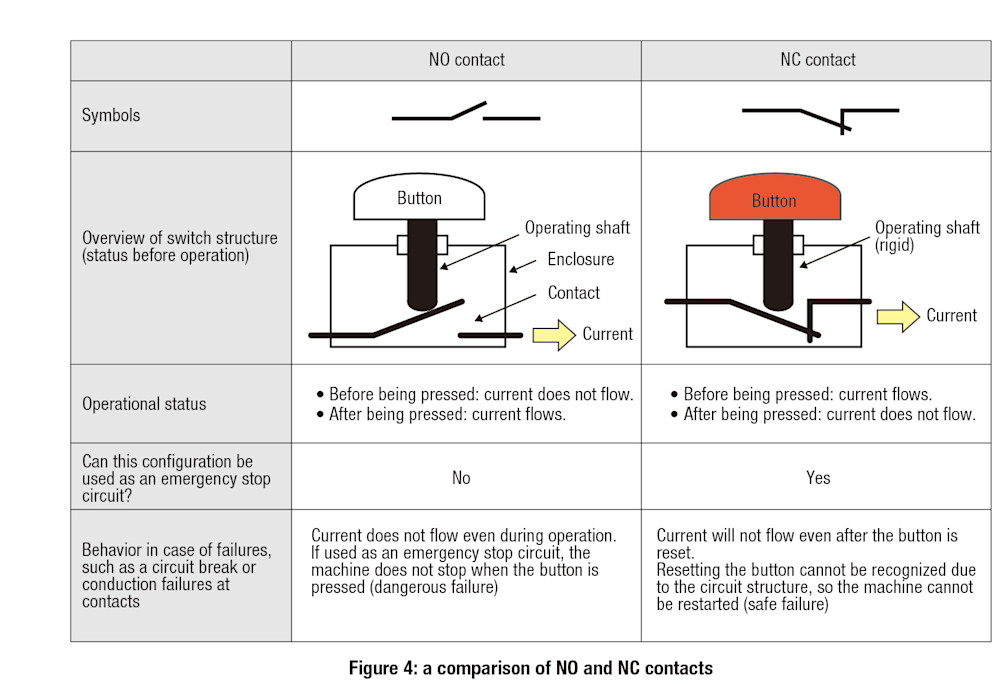
In circuits with NC contacts, the default ‘closed’ state means: the circuit is complete = the current is flowing = the machine is running. If the NC contact is opened, the current flow will be blocked = the machine will stop.
NC contacts are often used in safety circuits for emergency stop switches, and for other safety devices such as interlock switches and fail-safes. In a circuit that’s closed by default, it’s easier to detect wire breaks and other faults.
O is for: operator
To some people, ‘operator’ is another name for the e-stop’s actuator (the part you press to activate the emergency stop function). To others, the ‘operator’ is the human who presses the switch in an emergency.
P is for: Performance Level (PL)
A “discrete level that specifies the ability of safety-related parts of a control system to perform a safety function under foreseeable conditions”, according to ISO 13849-1.
In other words, the quality of protective measures in a control system are given a PL value, from a to e (a being lowest, and e being highest), based on how well they prevent against dangerous failures.
The minimum required performance level (PLr) for an emergency stop switch is PLr c (or SIL 1). This performance level is calculated using the e-stop’s B10d value, amongst other factors.
Q is for: qualified personnel
Activating an emergency stop switch is as simple as finding and pressing the button – isn’t it?
Before that, the switch needs to be installed correctly by someone with specialist knowledge. Many makers, including IDEC, make sure that catalogs for e-stops (and other safety devices) contain instructions and safety precautions for installation and use. A failure during installation could mean that the e-stop doesn’t work as intended at a crucial moment.
People who may need to use an e-stop that’s installed in their workspace should be trained in what an emergency stop switch does, how it works, and when to press it. For example, treating an e-stop as simply a way to stop a machine – whether there’s an immediate safety risk or not – is not best practice.
R is for: reset methods
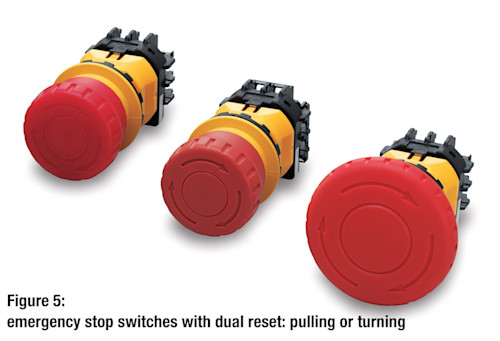
An emergency stop switch must be reset manually, and there are 2 common ways that this can be done: by 1) pulling or 2) turning (twisting) the actuator.
Revisions to ISO 13850 in 2015 added 2 important requirements for reset:
If the turning direction is indicated with arrows, the arrows should be the same color (or “nearly” the same color) as the actuator.
Unlatching (reset) with a key on the actuator should be avoided. If this is the only possible method, extra precautions must be taken to prevent hand injuries.
S is for: Safe Break Action
This mechanism is unique to several of IDEC’s X series emergency stop switches.
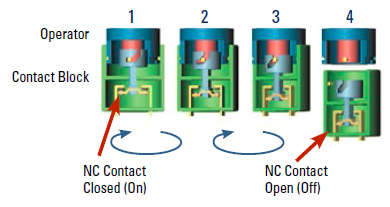
With Safe Break Action, the NC electrical contacts are forcibly separated even if the contact block isn’t fully attached.
The design guarantees that, should the contact block become (partly or fully) disconnected, the circuit will still be broken and the machine will stop.
Safe Break Action also ensures that IDEC e-stops will fail to a safe state even if damaged or incorrectly installed.
T is for: technological advancements
Conventional e-stops have ‘tried and trusted’ design – there’s no need to reinvent a device that meets strict safety requirements and works effectively as is.
New technologies can build on core e-stop functions, but only if they continue to ensure safe operation and compliance. This means many things can’t be done, even if they sound innovative or clever. A touchscreen that displays an e-stop icon wouldn’t meet safety standards, because there must be a physical switch (not just a graphic of one).
As a result, emergency stop switches have evolved to be essential parts of larger, more sophisticated control systems. The same design and functions, with new levels of compatibility and connectivity.
U is for: “unintended actuation”
The official term for ‘pressing the switch by accident’, used in ISO 13850.
The requirements of ISO 13850 prioritize using the e-stop’s location to prevent unintended actuation – placing it away from areas with heavy traffic. This should be done “as far as practical” without negatively affecting access to the switch.
V is for: visibility
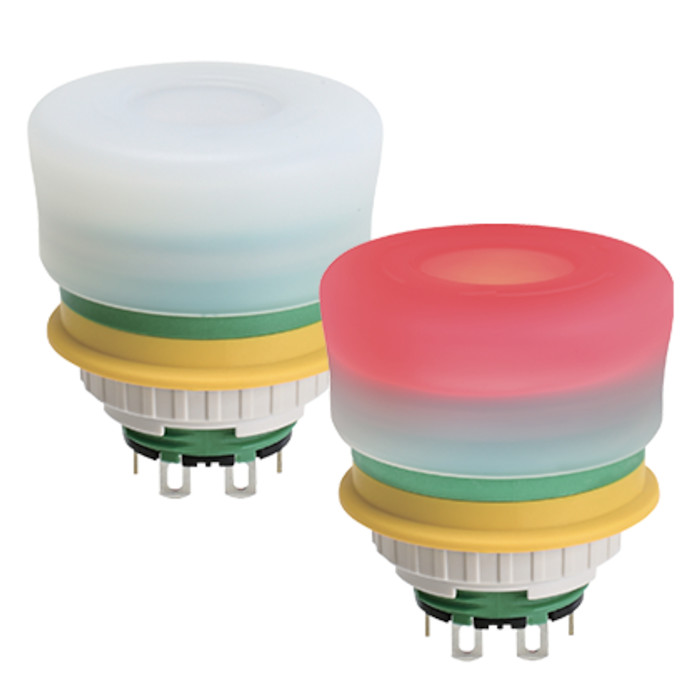
On detachable/cableless operator control stations, it should always be clear whether the e-stop device is active or inactive to prevent confusion. One suggested way to do this is to change the device color with illumination – when the switch is lit up (on) in red, it’s active.
Illuminated emergency stop switches are also easier to see from different angles, from further away, and in low lighting.
W is for: waterproofing
Emergency stop switches are widely used outside of industrial settings – and widely used outside. See if you can spot one next time you’re using public transport, in a car park, at an amusement park, or walking past a construction site.
These e-stops are exposed to the elements, including rain and snow. They need to have a robust level of environmental resistance, to guard against electrical faults, breakages and other damage that could be caused in outdoor environments.
IDEC E-stops typically have an IP65/IP67/IP69K protection rating. That represents full protection against dust and dirt, plus protection against low-powered water jets from any angle (IP65) or against full immersion for up to 30 minutes (IP67).
X is for: XA/XW series e-stops
Our X series emergency stop switches are compliant with strict international safety standards and versatile enough for wide-ranging applications. Features and options across the product lineup include:
Safe Break Action
Illuminated options (including low voltage types)
Short body options that reduce installation space
IP65/IP67/IP69K protection rating (depending on the model)
UL type 4X certified for use in wet/windy conditions
You’ll see an XA e-stop front and center as a safety measure on the HT4P Safety Commander tablet holder. It can be retrofitted with a switch guard if needed.
Y is for: yellow
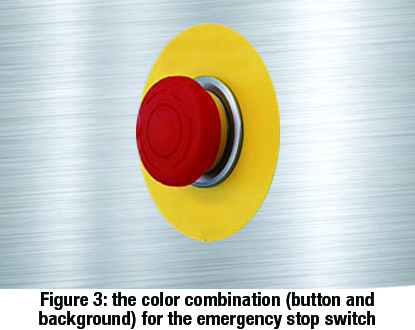
“As far as a background exists behind the actuator and as far as it is practical, the background shall be colored yellow.”
A red switch with a yellow background is universally understood as an e-stop. The safety standards don’t specify an RGB or Pantone color, but ‘e-stop yellow’ is bright and unmistakable.
The red-yellow color combination stands out in any environment and makes the purpose clear, transcending language barriers. ISO 13850 specifies that no text or symbols should appear on the switch or the background. They take longer to read in an emergency, and may not be easily understood by all workers.
Z is for: zoning
The positions of e-stops are critical to their effectiveness. The requirements that an emergency stop must be visible, accessible, and within reach at all times put limits on how far apart they can be installed.
In environments with multiple switches over a wide area (e.g. at several points along a production line), think of each e-stop as covering a danger ‘zone’ that operators work in. Anyone in the area around the nearest switch can easily see, reach, and press it.
Emergency stop switches should be installed at each operator control station (unless the risk assessment indicates this isn’t necessary) and at other locations identified as part of the risk assessment.
Other locations’ (as listed in ISO 13850) include:
Entrances and exits
Locations where intervention to the machinery is needed
All places where human-machine interaction is expected by design
IEC 60204-1 also includes a section on where e-stops should be located – essentially, install them wherever they’re needed.
Reaching for and pressing the switch shouldn’t create any other hazards for the operator. There shouldn’t be anything blocking the switch, for example, or any moving parts in the way that the operator would need to reach over or through.
Safety doesn’t stop here – we’ll help you learn more and do more
Explore e-stops with IDEC. As well as the XA and XW ranges, we have the XN series with padlock options to prevent unlatching, and the X6 series with a slimline unibody design. Reach out for expert advice on how emergency stop switches can enhance safety at your workplace, and which models best suit your needs.
We provide a wide range of help and resources:
If you have questions or suggestions, we're here to listen.
Our sales and support teams are on hand to help.
All the technical documentation you need.