
What is a safety laser scanner? | India
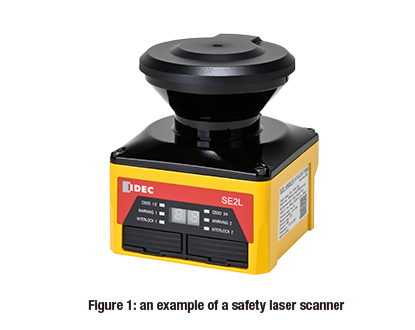
Safety laser scanners (also known as ‘laser scanners’) are safety devices that are mainly used at factories and other production/logistics sites. They detect when a human is approaching dangerous machinery or equipment (as shown in figure 1).
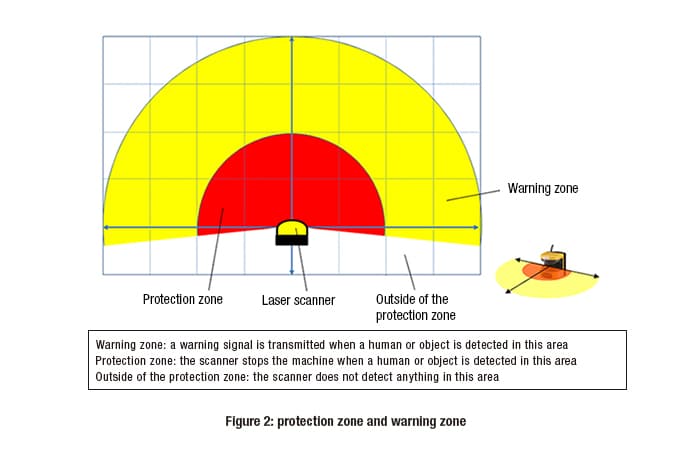
When a human enters the laser scanner’s warning zone (the yellow zone shown in figure 2), the system issues a warning signal that alerts the human with a buzzer sound and/or a constant/flashing indicator light. In addition, if a human enters the protection zone (a dangerous space) within the warning zone, the scanner sends a signal to stop the machine.
Once the safety laser scanner has stopped the machine, the machine will not be able to restart as long as the human remains in the protection zone. The machine cannot be restarted unless and until the human leaves the protection zone.
When configuring the warning zone, there is a certain amount of flexibility. It is possible to configure a single warning zone, multiple warning zones, or to not have one at all.
Principles of distance detection
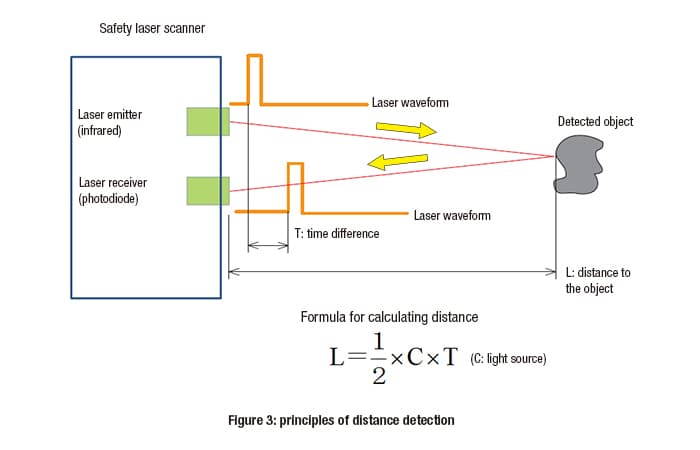
Laser scanners typically use infrared lasers to detect humans and objects. These lasers are invisible to the human eye.
The distance to the detected object (e.g. a human) is calculated by measuring the amount of time it takes for the laser beam to hit the object and be reflected back to the scanner (as shown in figure 3).
Laser scanners can also detect where in the warning zone or protection zone a human or object is located. They calculate the distance to the detected object by projecting laser beams in a fan shape, each at a slightly different angle.
Safety laser scanner applications
Presence detection in dangerous areas
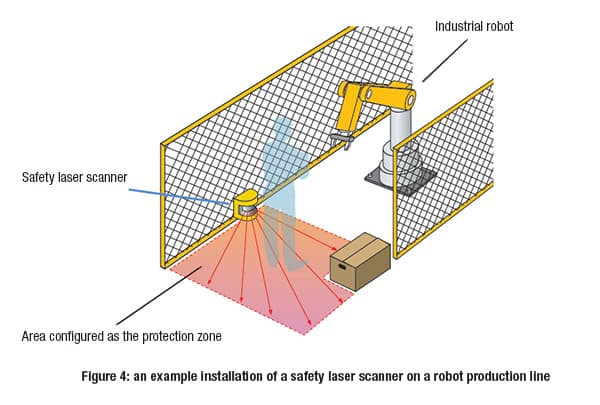
One common use of safety laser scanners is to detect the presence of humans before they enter areas with hazards (dangerous zones).
For example, on a production line where a human supplies workpieces to a robot (as shown in figure 4), the robot’s operating area is configured as the protection zone. Whenever a human enters the protection zone to set the workpiece, the robot stops.
Detection zone settings
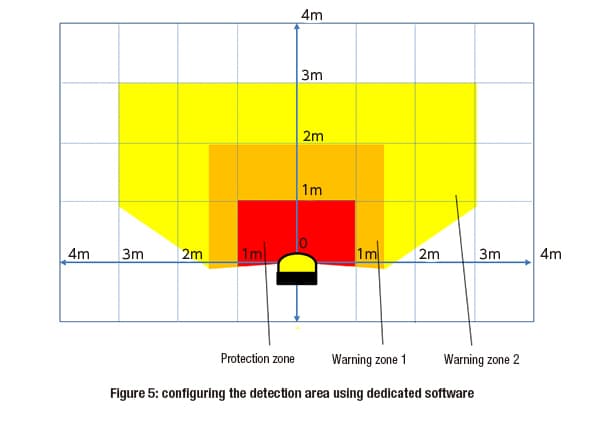
Typically, detection zones (e.g. warning zones and protection zones) can be configured using special software that enables the user to customize the shape of the detection zone (as shown in figure 5).
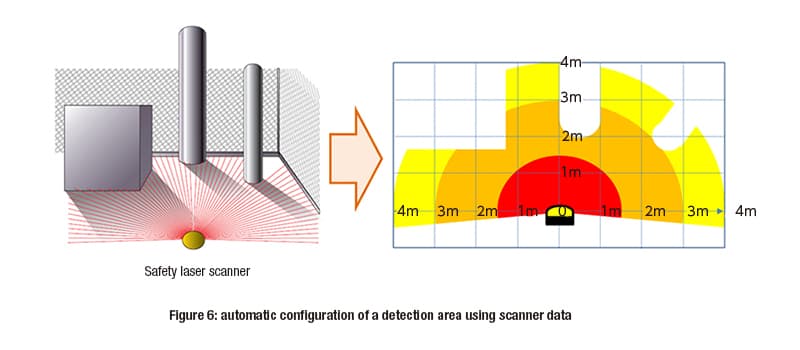
Detection zones can also be configured based on data collected by scanning the actual installation area (as shown in figure 6).
When configuring a protection zone, the minimum distance required for safety (as specified by the relevant safety standards) must be met. The minimum distance required is based on the machine/equipment’s potential area of movement.
In addition, when configuring a detection zone, the minimum detectable object size must also be taken into consideration.
The safety laser scanner emits laser beams in a fan shape. As a result, the further small objects are from the light source, the harder they are to detect (i.e. the minimum detectable object size increases).
At the edge of the protection zone, the minimum detectable object size is a roughly 70mm diameter.
Precautions for installation and use
Please keep the following points in mind.
When configuring the protection zone, it must meet the minimum distance required for safety as specified in the relevant international safety standards.
External light sources, such as fluorescent lights, sunlight or infrared light, can cause detection errors. Install the safety laser scanner so that the optical window is not directly exposed to external light.
In humid, steam-filled and dusty work environments, air pollution, steam, dust or dirt may block the laser beams or make the optical lens dirty, leading to detection errors. The optical window may need regular cleaning. Check the installation environment carefully in advance.
If there is a reflective surface nearby, such as a wall or other object, the distance to the surface may not be calculated correctly. This may lead to detection errors. Check for any potential detection errors before installation.
IDEC safety laser scanners
We provide a wide range of help and resources:
If you have questions or suggestions, we're here to listen.
Our sales and support teams are on hand to help.
All the technical documentation you need.