
Illuminated emergency stop switches on teaching pendants: the future of industrial safety looks even brighter
Date: 08/11/2024 | By: IDEC HQ
Would you take a robot teaching pendant without an emergency stop button inside a safety fence where a robot is working?
No, you wouldn’t.
If the robot malfunctions or the operator is put in a dangerous situation, the emergency stop (e-stop) function can save their life and prevent damage and injury.
Teaching pendants and e-stops: long established as a reliable combination
The e-stop has been an essential safety feature for industrial robot teaching pendants (also known as teach pendants) for many years. Even if the switch is rarely used, it’s important – and reassuring – for the operator to have one easily accessible at all times.
This reliability has stayed true as teaching pendants have evolved: from wired devices to lightweight tablets with touchscreens and wireless communication.
The importance of emergency stop switches hasn’t changed – that said, they have similarly moved with the times. As automated equipment continues to become smaller, the need for e-stop functionality is being met by a trend towards ever smaller solutions.
The revised ISO 13850:2015 standards uphold the importance of the emergency stop switch, while incorporating market changes.
Updates to safety standards also mean new ways to ensure compliance
The specifications for e-stops to meet the requirements of ISO 13850:2015 are:
“4.1.12: The emergency stop function shall be available and operational at all times.
4.3.6: The actuator of the emergency stop device shall be coloured RED. As far as a background exists behind the actuator and as far as it is practicable, the background shall be coloured YELLOW.”
For the emergency stop function on portable operator control systems:
“4.3.8: When emergency stop devices are installed on detachable or cableless operator control stations (e.g. pluggable portable teaching pendants), at least one emergency stop device shall be permanently available (e.g. in a fixed position) on the machine.
In addition, at least one of the following measures shall be applied to avoid confusion between active and inactive emergency stop devices:
device colour changing through illumination of the active emergency stop device;
automatic (self-actuating) covering of inactive emergency stop devices; where this is not practicable, manually-applied covering may be used, provided that the cover remains attached to the operator control stations;
provision of proper storage for detached or cableless operator control stations.”
Up to now, emergency stop buttons haven’t used color illumination to indicate the active/inactive status. When users need to make it clear that the emergency stop function is inactive, they’ve often had to cover the switch or keep it stored in an appropriate location.
IDEC’s XA/XW series of short body emergency stop switches offer a new type of illumination that complies with the requirements of ISO 13850:2015. They make it easy to determine the emergency stop function’s status based on the illumination: not lit up (off) when inactive, and lit up (on) when active. They also meet the requirements for an emergency stop, as they turn red when lit up (on).
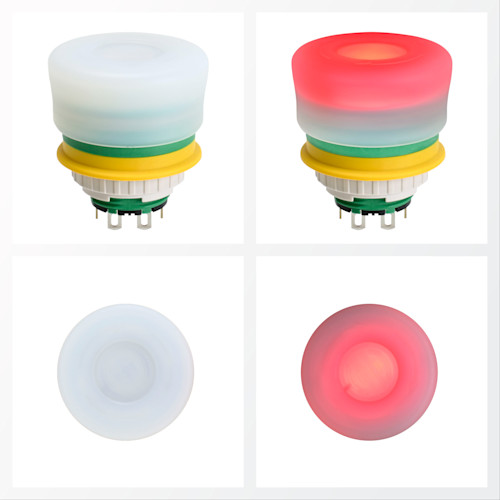
What makes this illuminated emergency stop switch, which complies with ISO 13850, a logical safety step?
According to the requirements, the emergency stop function “shall be available and operational at all times” to meet safety standards. In addition, ISO 13850 includes a measure to indicate the active/inactive status of the switch by changing the color of the lighting.
However, conventional e-stops with illumination are only partially lit up. The light may be harder to see as a result. If you want to use the color of the lighting to distinguish between active/inactive status, if the unit handle color is originally red then it is harder to determine whether the emergency stop is active or inactive. This means it is not easy to see if the unit is lit when indicating an active status.
The switch handle on IDEC’s new XA/XW series illuminated e-stop is fully lit up whenever the function is active. If the button is not lit up in red, you immediately know it is not available or operational. The status can be confirmed from further away, from more angles, and in work environments with lower or minimum lighting.
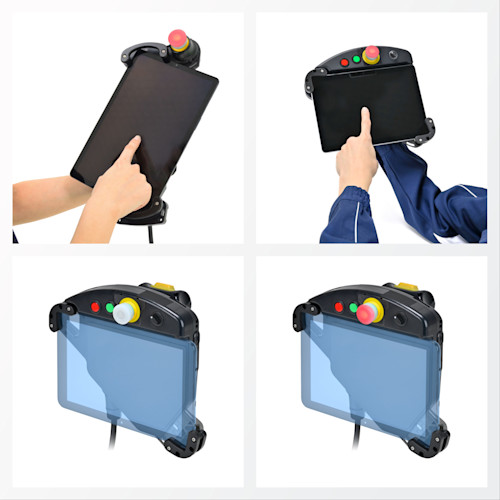
When mounted on a teaching pendant, an e-stop that lights up can support operators who are concentrating on other work processes. In other words, a teaching pendant equipped with IDEC's illuminated e-stop can clearly indicate a machine failure to you before an unexpected situation occurs.
IDEC continues to lead the way with bright ideas and safety innovations
Illuminated models are options in the IDEC XA and XW emergency stop switch lineups (white body with a red light, or red body with a red light). The newest XA series illuminated switches are fitted on the IDEC HT3P and HT4P Safety Commander tablet holders with built-in safety functions.
On Safety Commander tablet holders, the switch is positioned for easy access with either hand. It visually and physically stands out from the other optional buttons and switches available.
IDEC’s illuminated e-stop switches maintain the space-saving design, reverse energy structure, lock/opening mechanisms, and environmental protection ratings that users expect.
The combination of a teaching pendant with an illuminated emergency stop switch is still relatively rare. You can explore this possibility with IDEC products and solutions right now.
We provide a wide range of help and resources:
If you have questions or suggestions, we're here to listen.
Our sales and support teams are on hand to help.
All the technical documentation you need.