
4 fundamentals for selecting the best PLC for your needs: take simple steps toward smarter automation
Date: 29/01/2026 | By: IDEC HQ
However you choose to design and build your industrial control system, a programmable logic controller (PLC) is an essential element.
But which one? How do you select a PLC in the first place?
Numerous manufacturers offer PLCs with different functions and specs to meet various user needs. It’s easy to get lost in (what feels like) endless lists of product codes and datasheets.
Finding the right PLC for your system doesn’t have to be a daunting task. At IDEC, we break down the selection process into just 4 simple steps.
1. Inputs: devices that keep the PLC informed
A PLC without inputs may as well be a brick. If no devices are connected, the PLC has no data to process.
Start by identifying the input devices your system needs – digital, analog, or a mix of both.
Digital inputs: typically signals from machine-mounted devices and control panel switches.
Common examples of digital input devices:
Sensors
Switches and pushbuttons
Encoders
Analog inputs: signals that come from devices that measure variables.
Common examples of analog input data:
Solid/liquid fill level
Liquid pressure and flow
Temperature and humidity
The position, speed, and distance of an object
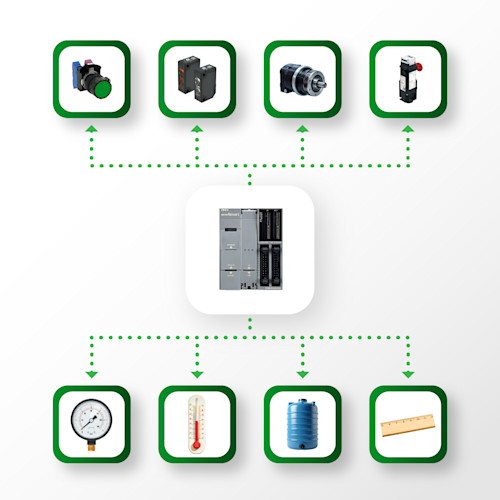
Common analog input types and devices include:
0-10V DC current signals
0-20mA current signals
4-20mA current signals
Resistance temperature detector (RTD)
Thermistor (temperature sensor, current measurement)
Thermocouple (temperature sensor)
Current signal ranges can be used to represent almost any relevant variable: flow, fill level, temperature, pressure, etc.
One input device that can be either digital or analog is the high-speed counter – a common feature in industrial PLC systems.
Some inputs (e.g. rapid pulses, machine rotations, items on a production line) have such a high frequency that a standard sensor is unable to count them all or process the results fast enough. High-speed counters are specific, assigned input devices to quickly and precisely measure high-speed input values.
Once you know which inputs your system requires, you can start narrowing down PLC options to only those with a suitable number of I/Os.
2. Outputs: using data and logic to take action
After receiving and processing data, the PLC sends signals back out to external devices.
Digital outputs: simple ON or OFF signals (start/stop, open/closed, etc.).
Common examples of digital output devices:
Contactors
Indicator lights and buzzers
Simple valves (fully open or closed)
Relays
Analog outputs: a variable output signal determined by the PLC’s data processing.
Common examples of analog output data:
Motor or pump activation
Temperature changes (heating or cooling)
Speed control
Partial opening/closing of valves
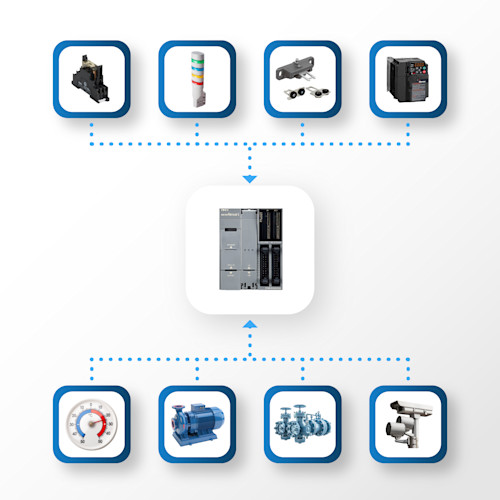
Your system doesn’t need to have the same number of PLC inputs and outputs. That said, if your system has a combination of digital and analog inputs it’s likely to have both digital and analog outputs as well.
Common analog output types include:
0-10VDC current signals
0-20mA current signals
4-20mA current signals
As with the input signals, the current signal output range can represent different output variables: speed, rpm, degree of opening/closing, etc.
The number of I/Os a PLC can provide is important – so is scalability. If you’re considering adding inputs and/or outputs in future, I/O expansion capabilities should factor into your purchasing decision.
3. Special functions: system customization that adds value
Some PLCs have built-in functions tailored to specific applications. They make life much easier for users looking for a customized solution.
As just some examples, you may decide that you need:
High speed counting: as mentioned above, dedicated inputs to count rapid signal pulses from a specific device.
PID control: constant monitoring and adjustments for optimization of e.g. fill level, pressure, temperature, etc.
Motion control: precise control of motors or actuators to coordinate (synchronize) the movement of machines.
Email: settings to send alerts, status updates, and other notifications via the PLC’s Ethernet connection.
Web server: the ability to access and view PLC (CPU) data via the web browser on a mobile device. In some cases, the website is predefined and built into the PLC, configurable with dedicated software.
Data logging: the ability to record system events with timestamps and user data, stored on either the PLC itself or on an SD card.
Recipe handling: management of multiple pre-set instructions and parameters (recipes) that can be loaded and used as required.
Other things to think about – not functions, but equally important to your application – are the PLC’s power supply and operating voltage. Whether it runs on AC or DC power, the input/output voltages, and the current ranges will all affect wiring. These factors typically vary by maker, helping you to slim down the field.
4. Communications: how your system devices share their data
Effective communication between multiple devices is the backbone of industrial automation systems.
The PLC and other devices in your system need to be able to talk to each other in a language they can both understand. As such, communications use standard network protocols.
There are several ways to connect your devices, depending on the PLC:
Ethernet (one or more ports)
Serial ports (RS232C, RS422, RS485)
Network protocols via either the Ethernet or serial ports*: e.g. EtherNet/IP, Modbus TCP, Modbus RTU, BACnet, MQTT Sparkplug B, CC-Link IE Field Basic
* Some network protocols only work via Ethernet, and some only work via a serial port. Be sure to check this when confirming device compatibility.

Other questions to ask yourself:
How many communication protocols does my PLC need to support devices in the current system? – ensuring compatibility with all necessary input and output devices is key.
Does the PLC need to communicate with another PLC? – some network protocols specifically support PLC-to-PLC communication.
Does the PLC offer the flexibility and compatibility needed to expand the system and add additional devices? – if it’s likely that your system will grow and change, scalability is important.
Are devices in the system communicating 1-to-1, or are any devices communicating with multiple others? – as an example, RS232 is designed for single point-to-point connections.
Use these 4 steps to work out which PLC is best for you
Armed with this core information about your system needs, you can put together a basic requirements list for a PLC.
It doesn’t need to be complicated:
Fundamental | What I need |
|---|---|
Digital inputs | 54 |
Digital outputs | 39 |
Analog inputs | 3 |
Analog outputs | 2 |
Special functions | PID control |
Communication | Ethernet, Modbus TCP |
(Optionally add the required power supply and operating voltage to this list.)
You can then focus your search down to PLCs that can meet – or exceed – these requirements.
In the case above, the IDEC FC6A MicroSmart Plus PLC would tick all the boxes:
Fundamental | Needed | FC6A MicroSmart Plus PLC |
|---|---|---|
Digital inputs | 54 | Up to 2,060 I/Os, depending on your choice of added FC6A digital/analog I/O modules |
Digital outputs | 39 | "" |
Analog inputs | 3 | "" |
Analog outputs | 2 | "" |
Special functions | PID control | YES with simple configuration using WindLDR software |
Communication | Ethernet, Modbus TCP | YES (2 Ethernet ports) as well as Modbus RTU, EtherNet/IP, BACnet, and MQTT Sparkplug B |
It offers a variety of other useful features that you might decide you want or need, such as:
Web server functionality
Email and text messaging
Data logging (SD card slot)
Bluetooth and FTP client/server communication options
A dedicated iOS/Android app (WindEDIT)
PID algorithm
With IDEC, selecting your PLC is as easy as ABC
IDEC has been developing PLCs and other similar control and safety products for over 50 years. Get more advice from our regional sales team on the best PLC for your needs.
We provide a wide range of help and resources:
If you have questions or suggestions, we're here to listen.
Our sales and support teams are on hand to help.
All the technical documentation you need.